Ricoh FOCUS 3-MODE Especificaciones Pagina 17

  • Descarga
  • Añadir a mis manuales
  • Imprimir
  • Pagina
    / 22
  • Tabla de contenidos
  • MARCADORES
  • Valorado. / 5. Basado en revisión del cliente
Vista de pagina 16
USING THE CONTINUOUS SHOOTING MODE
This mode allows you to shoot continuously as long as the shutter is pressed.
You can accurately capture the continuous action of car races, competitive sport events, and even the movements of
an infant without missing any important moments.
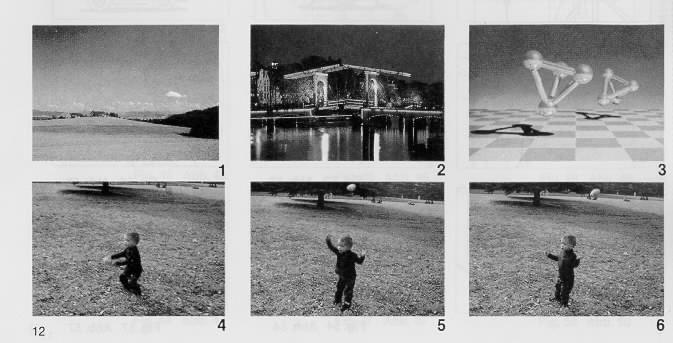
This mode was used when photos 4, 5, 6 (see on page 12) of the sample collection was taken.
Click here to see photos 1 - 6
1. Press the Mode Button to set your camera in the Continuous Shooting Mode. Confirm that the (C) mark appears in
the LCD Panel. (Fig. 44)
2. Press and hold down the Shutter Release Button. Your camera will continuously take pictures at a rate of one frame
per second as long as the Shutter Release button is held down. (Fig. 45)
4www.butkus.org
3, Press the Mode Button to cancel the Continuous Shooting Mode Confirm that the Hi mark disappears on the LCD
Panel.
* If you want to cancel the Continuous Shooting Mode before taking any picture, press the Mode Button again until
the mode marks go off, or close the Lens Shield.
Combining the Continuous Shooting Mode and the Self-timer:
1. Set your camera to the Continuous Shooting Mode
2. Press the Self-timer Button. Your camera will wait 10 seconds, then shoot two sequential frames.
Vista de pagina 16
1 2 ... 12 13 14 15 16 17 18 19 20 21 22

Comentarios a estos manuales

Sin comentarios

Vauxhall Insignia 2014 R300 Color manuels

Manuels d'utilisation et guides de l'utilisateur pour Systèmes de navigation pour voitures Vauxhall Insignia 2014 R300 Color.
Nous fournissons des manuels en pdf 3 Vauxhall Insignia 2014 R300 Color à télécharger gratuitement par type de document : Spécifications


Table des matières

Contents

2

Touch R700 / Navi 900

4

Introduction 7

8

8 Introduction

9

Introduction 9

10

10 Introduction

11

Introduction 11

12

Controls

14

14 Basic operation

15

Basic operation 15

16

16 Basic operation

17

Basic operation 17

18

18 Basic operation

19

Menu operation

20

20 Basic operation

21

Basic operation 21

22

Keyboards

23

Basic operation 23

24

24 Basic operation

25

Basic operation 25

26

Favourites

27

Basic operation 27

28

28 Basic operation

29

Basic operation 29

30

Contacts

31

Basic operation 31

32

32 Basic operation

33

Basic operation 33

34

34 Basic operation

35

Touch operation overview

36

36 Basic operation

37

Basic operation 37

38

38 Basic operation

39

42 Basic operation

43

Basic operation 43

44

44 Basic operation

45

Waveband menus

47

Radio 49

50

CD Player 51

52

52 CD Player

53

54 External devices

55

56 External devices

57

Playing movies

58

Using apps

59

External devices 59

60

Navigation

61

Navigation 61

62

62 Navigation

63

Navigation 63

64

64 Navigation

65

Navigation 65

66

66 Navigation

67

Navigation 67

68

Destination input

69

Navigation 69

70

70 Navigation

71

Navigation 71

72

Guidance

73

Navigation 73

74

74 Navigation

75

Navigation 75

76

76 Navigation

77

Navigation 77

78

Speech recognition

79

Speech recognition 79

80

80 Speech recognition

81

Speech recognition 81

82

82 Speech recognition

83

Speech recognition 83

84

86 Phone

87

Phone 89

90

90 Phone

91

92 Phone

93

Frequently asked

94

94 Frequently asked questions

95

Frequently asked questions 95

96

R300 Color / R400 Color

102

Introduction

103

Theft-deterrent feature

104

Control elements overview

105

Introduction 105

106

106 Introduction

107

Introduction 107

108

108 Introduction

109

Basic operation

110

Tone settings

111

Volume settings

112

System settings

113

Basic operation 113

114

114 Basic operation

115

Station search

116

Favourite lists

117

Radio 117

118

Radio data system (RDS)

119

Digital audio broadcasting

120

120 Radio

121

CD Player

122

122 CD Player

123

CD Player 123

124

External devices

125

External devices 125

126

Playing audio

127

External devices 127

128

General information

129

Bluetooth connection

130

130 Phone

131

Emergency call

132

Operation

133

Phone 133

134

134 Phone

135

Mobile phones and CB

136

136 Phone

137

Phone 137

138


Plus de produits et de manuels pour Systèmes de navigation pour voitures Vauxhall

Modèles Type de document
Aucun